Showing posts with label widgets. Show all posts

Monday, 9 February 2015

Designing Your Blog Layout

You only have a few seconds to catch a web surfer's interest with your blog.  You want to make your blog design attractive, to get the reader's attention, and easy to navigate, to get the reader to stay. Susan Getgood, in Professional Blogging for Dummies, (http://www.goodreads.com/book/show/7947250-professional-blogging-for-dummies) outlines a few points to remember when designing your blog.

Masthead

Your masthead, which includes your title, tagline and/or a graphic, is the first thing that readers see. It doesn't hurt to devote some time and effort to it.  Consider which colour scheme you would like. Should it match an already existing website?  My blog masthead does not have a photo or picture per se, but my background does include a world map.


Talbert Talks Travel incorporates a beautiful photo above its masthead at www.miamibeach411.com.


Logo

If you decide to include a logo, you have the option of making it yourself or hiring a professional. You can go to www.istockphoto.com to find free photos.  Similarly, you can obtain a Creative Commons license to have access to free graphics.  If you have your heart set on a unique, professional look, hire a graphic artist to design your logo ($500-$1500).


Kitchen Girl has a professional looking logo at www.tastydays.com.


Other Imagery

If your blog is a business one, you will want to include product photos, graphics and logos.  If you have a humorous blog, you might include cartoons.
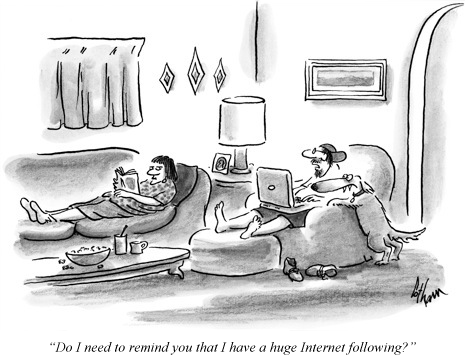


A little humour never hurts courtesy wordpress.com.


Format

How many columns do you want?  Where will you place your main post:  to the left, to the right or in the centre of the blog?  My blog home page shows my blogroll at the top left, my top five posts at the bottom left.  To the right, I have a blog counter and my blog followers under which I have my blog archives.


This Beauty Blog has a neat, easy to scan layout at advicesacademy.netdna-cdn.com.


Widgets, Buttons, Badges

Buttons are the small, clickable graphics that link to web content.  Badges are bigger buttons which are used as promotional tools.  Widgets have functionality ex. search features, blogrolls, recent visitors, Twitter posts, RSS feeds.


Good use of widgets, buttons & badges at May Dreams Gardens at 


Advertising/Sponsors

Decide whether or not you would like to provide advertisements on your blog.  You can advertise through Google Adsense.  What types of advertising would you like and what size will the ads be? You have to remember:  how will ads affect the overall look of your blog?  Typically, the blogs that I read seem to have two or three ads running at a time.  Too many can crowd out the blog posts and turn readers off.


Bakerella incorporates ads into its blog nicely at www.bakerella.com


Surf the Internet and look for blogs that you find attractive and that you find easy to navigate.  Try to imitate their designs.

For more information, visit http://www.successfulblogging.com/16-rules-of-blog-writing-which-ones-are-you-breaking/.

For a blog setup tutorial with Wordpress. Visit https://www.siteground.com/tutorials/blog/wordpress.htm.


Wednesday, 4 February 2015

Choosing a Blogging Platform

You are starting a blog and want to know the ins and outs of blogging.  Borrow a copy of Blogging for Dummies (http://www.amazon.ca/Blogging-For-Dummies-Lupold-Bair/dp/1118712099or Professional Blogging for Dummies (http://www.amazon.ca/Professional-Blogging-Dummies-Susan-Getgood/dp/0470601795) from your local library.  Or, like I did, visit Ollies Discount Store in Niagara Falls New York and purchase a copy for only $6.99 (U.S).


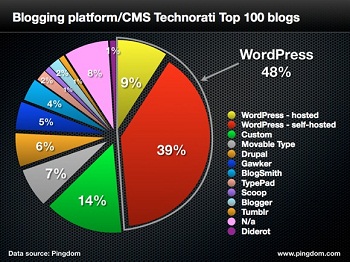
So far, I've talked about picking a blogging niche, a blog name and the history of blogging.  Today, I am going to talk about a blogging platform.  I thought a blogging platform was like a philosophy; however, it is nothing of the sort.  A platform is simply the software a blogger uses.  Popular blogging platforms are Blogger, WordPress and Tumblr which are all free.  TypePad is also a platform, but comes with a fee.  For more information, read Word Press for Dummies (http://www.amazon.ca/WordPress-For-Dummies-Lisa-Sabin-Wilson/dp/1118073428).

Blog platforms typically include a dashboard, a library of design templates.  You follow the platform's instructions to apply the template to your blog.  Professional Blogging for Dummies recommends that you set up a test blog to see what works best for you, thereby answering questions like:

1.  Do you like the dashboard?
2.  Is it easy to change the blog's design?
3.  Are support forums offered?
4.  Are you able to customize your blog using widgets and plug-ins?
5.  Are you able to map your own domain name to the blog address assigned by the service?

For more information about blog platforms visit http://thenextweb.com/apps/2013/08/16/best-blogging-services/.

Some blogging platforms also serve as hosting services.  However, you can pick a separate platform and hosting service.  Keep in mind that if you want to link your new blog to an already existing website, you can't use a hosting service.  If you choose to go with a separate hosting service, here are some points to remember.  First, choose your platform first, and your hosting service second.  The service must be compatible with the platform.  Second, pick a service that will allow you to use your own domain name.  That should remain front and centre.  Third, if you read a blog which you really like, don't hesitate to ask the blogger what host service they use.  Fourth, pick a hosting service with adequate storage for possible photos, podcasts, etc.  To learn more, read (http://www.amazon.com/Podcasting-For-Dummies). Fifth, research the company's reputation.  Sixth, if all else fails, hire a blog consultant or designer. Finally, look at the control panel you will be using to manage your web hosting account.  Is it user friendly?  Possible host services include Web.com, Go Daddy, Network Solutions, BlueHost and DreamHost.

For more information about web hosting services visit http://www.seanogle.com/entrepreneurship/best-hosting-services.